Thursday, August 16, 2012
C# convert document to string type.
Hi Guys,
There was a situation in my project where I have to convert a xml document to string type, initially I though it is very difficult, and later I felt it is a cake-walk actually!, the below code snippet shows how to achieve it:
- First you create a XmlDocument object, then you load the content of the xml document file into the object , where 'file' is the path of the xml file.
- Create a stringwriter , and save the contnet of xmldocument object into the string writer 'sw'
- Convert the string writer 'sw' to string and store it in a string variable.
Thursday, August 2, 2012
Difference between null and String.Empty
1. string statement=null : means no object exists; null is not a value, it is a state indicating that object value is unknown or does not exists.
2. string statement = String.Empty : use of string.Empty doesn't create any objects while "" creates a string object. So using string.Empty is better than using "" because every time you use "", it creates a new string while string.Empty just reference s string in memory that is created by default.
Wednesday, August 1, 2012
Understanding Reflection and static constructor
Hi .net newbies,
This post is mostly for you !!, to understand what Reflection and static constructor really mean ,and when are they used in .net projects.
You would have learnt what does .net reflection and static constructor mean ,
You may say reflection is : The process of obtaining information about the assemblies and the types defined within them ,and creating and invoking and accessing type instance at run time and
You may say static constructor is used to initialize any static data or to perform a certain action that needs to be performed once.
So when do you use Reflection or static constructor, the below picture answers the question:
Monday, July 23, 2012
WCF as Windows Services Step by Step example
Hi Guys, in this post I will be explaining how to create a simple WCF service and host it as a 'Windows Service'.
Lets create a simple Windows Service which has a OperationContract which will add numbers and return it
Step 1: Create a simple WCF service library
Step 2: Create a simple Windows Services in which you will host the service
Step 3: Install the Windows Service
Step 4: Consume the Windows Services in a Windows Form Client.
Step 1: Create simple WCF Service library:
1. Open Visual Studio 2010 , Create new project and choose Windows Service Library named as Wcf_WindowsService_Add
2. Delete these files: App.config, IService1.cs, Service1.cs, and create your own WCF Service, Right click your project and create new item - > WCF Service name it as WindowsServiceAdd.cs
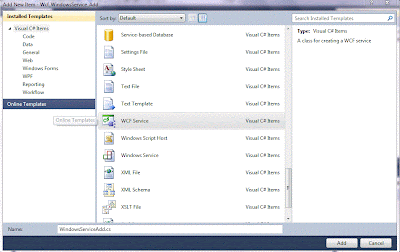
3. In app.config files you can see two endpoints with bindings wsHttpBinding and mexHttpBinding and with abase address
4. Open IWindowsServiceAdd.cs Interface remove Dowork() Contract and your Contract with name Add()
5. Open WindowsServiceAdd.cs remove DoWork() and define your Add() OperationContract :
6. Build your project , now your WCF Service library dll is ready to use.
Step 2: Create a simple Windows Services in which you will host the service:
1. Right Click your solution and create new project. -> Windows -> Windows Services.
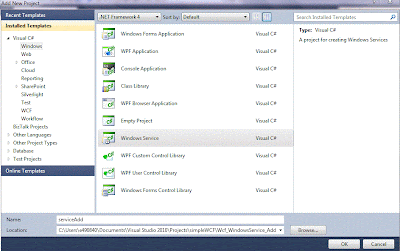
2. Delete Program.cs and Service1.cs and create your own Service , by right clicking the project add new item -> Windows Service

3. Click 'click here to switch to code view' , and modify the code as shown below to add a Service Host and methods to stop and start the services ,and add System.ServiceModel to your project , and your Service Library dll too
4. Add Program.cs file
5.Build this project . now it is ready to be installed in your machine
Step 3: Install the Windows Service
1. Inorder to install the service we need Installer class, so add new installer class:
2.Goto Start - > All programs -> Visual Studio 2010 - > Visual Studio Tools -> Visual Studio command prompt. Goto to path of your serviceAdd.exe , and install it using ' installutil serviceAdd.exe
3. You can see your service in Service Console
Step 4: Consume the Windows Services in a Windows Form Client.
1. Start your service , Create a new Windows Form project, refer your WCF hosted as Windows services ( http://localhost:8732/Design_Time_Addresses/Wcf_WindowsService_Add/WindowsServiceAdd/ ) to this project. add a lable and a button, double click the button and and add the bellow code , and run your project :
2. Build and Run your Windows Form to consume the service
Lets create a simple Windows Service which has a OperationContract which will add numbers and return it
Step 1: Create a simple WCF service library
Step 2: Create a simple Windows Services in which you will host the service
Step 3: Install the Windows Service
Step 4: Consume the Windows Services in a Windows Form Client.
Step 1: Create simple WCF Service library:
1. Open Visual Studio 2010 , Create new project and choose Windows Service Library named as Wcf_WindowsService_Add
3. In app.config files you can see two endpoints with bindings wsHttpBinding and mexHttpBinding and with abase address
4. Open IWindowsServiceAdd.cs Interface remove Dowork() Contract and your Contract with name Add()
5. Open WindowsServiceAdd.cs remove DoWork() and define your Add() OperationContract :
6. Build your project , now your WCF Service library dll is ready to use.
Step 2: Create a simple Windows Services in which you will host the service:
1. Right Click your solution and create new project. -> Windows -> Windows Services.
2. Delete Program.cs and Service1.cs and create your own Service , by right clicking the project add new item -> Windows Service
3. Click 'click here to switch to code view' , and modify the code as shown below to add a Service Host and methods to stop and start the services ,and add System.ServiceModel to your project , and your Service Library dll too
4. Add Program.cs file
5.Build this project . now it is ready to be installed in your machine
1. Inorder to install the service we need Installer class, so add new installer class:
2.Goto Start - > All programs -> Visual Studio 2010 - > Visual Studio Tools -> Visual Studio command prompt. Goto to path of your serviceAdd.exe , and install it using ' installutil serviceAdd.exe
Step 4: Consume the Windows Services in a Windows Form Client.
1. Start your service , Create a new Windows Form project, refer your WCF hosted as Windows services ( http://localhost:8732/Design_Time_Addresses/Wcf_WindowsService_Add/WindowsServiceAdd/ ) to this project. add a lable and a button, double click the button and and add the bellow code , and run your project :
2. Build and Run your Windows Form to consume the service
Thursday, July 5, 2012
Orchestration Dehydration & Rehydration
When many long-running business processes are running at the same time, memory and performance are potential issues. The orchestration engine addresses these issues by "dehydrating" and "rehydrating" orchestration instances.
Dehydration is the process of serializing the state of an orchestration into a SQL Server database. Rehydration is the reverse of this process: deserializing the last running state of an orchestration from the database. Dehydration is used to minimize the use of system resources by reducing the number of orchestrations that have to be instantiated in memory at one time.
The orchestration engine might determine that an orchestration instance has been idle for a relatively long period of time. It calculates thresholds to determine how long it will wait for various actions to take place, and if those thresholds are exceeded, it dehydrates the instance. This can occur under the following circumstances:
- When the orchestration is waiting to receive a message, and the wait is longer than a threshold determined by the engine.
- When the orchestration is "listening" for a message, as it does when you use a Listen shape, and no branch is triggered before a threshold determined by the engine. The only exception to this is when the Listen shape contains an activation receive.
- When a delay in the orchestration is longer than a threshold determined by the engine.
You can set 12 properties to configure how dehydration works in BizTalk Server. The topics in this section list and describe these properties and their default values, and discuss how various values affect dehydration behavior.
The orchestration engine can be triggered to rehydrate an orchestration instance by the receipt of a message or by the expiration of a time-out specified in a Delay shape. It then loads the saved orchestration instance into memory, restores its state, and runs it from the point where it left off. For more information about using shapes in orchestrations, see Orchestration Shapes.
An orchestration can be configured to run on more than one server. After an orchestration instance has been dehydrated, it can be rehydrated on any of these servers. If one server goes down, the engine continues to run the orchestration on a different server, continuing from its previous state. The engine also takes advantage of this feature to implement load balancing across servers.
Subscribe to:
Posts (Atom)